
Gym League How to Redeem Codes
PC and mobile steps for the Codes button, Submit, and inventory.
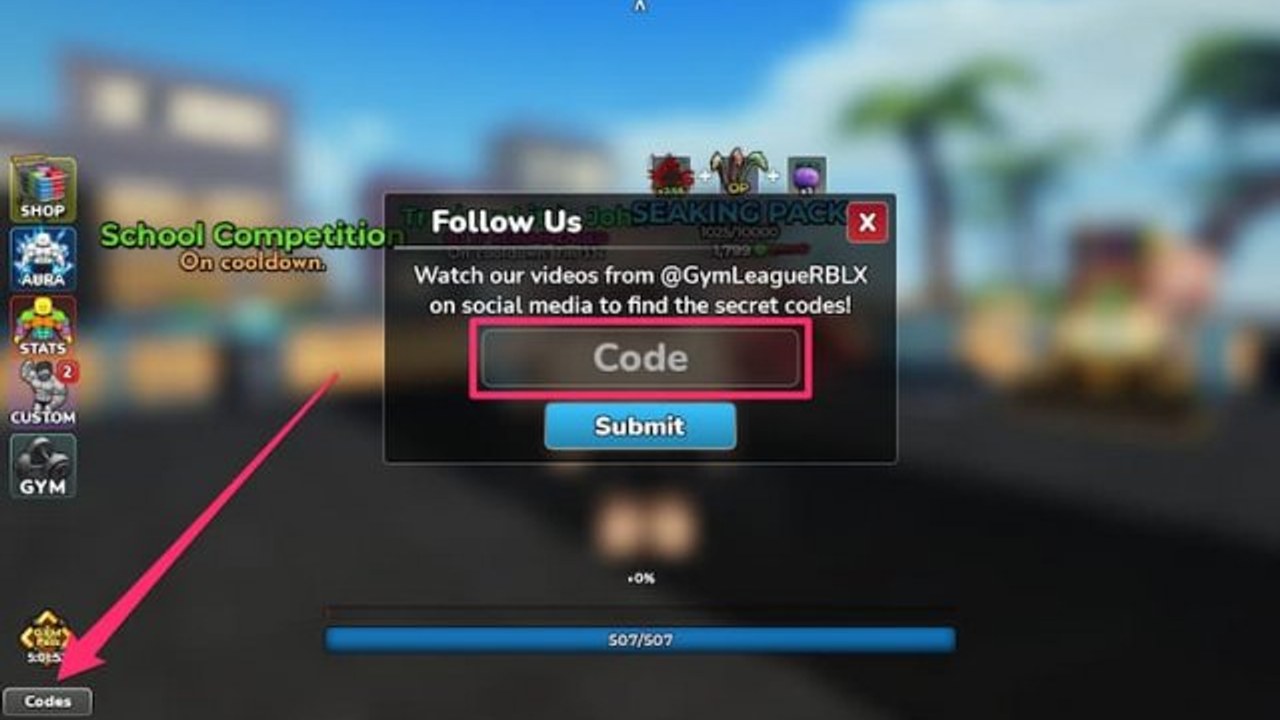
Redeeming Gym League codes is a two-minute HUD task, not a hidden quest. The game is a free 8-player Roblox bodybuilding simulator from 1v2 Studios, live since May 2024, and the Codes UI has stayed on the left side of the screen through Beach Gym, later gyms, and the Jungle era. You type a string, press Submit, and the reward goes to inventory or account currency. Miss the case, add a space, or paste an expired code, and Submit fails with no gift.
Do this on a fresh session before you buy a Body Alter or roll auras. Meal codes such as Breakfast of Champions, Warriors Lunch, and Dinner of Legends stretch machine time. Potion codes multiply posing payouts in competitions. The live strings live on the Codes Hub. This page is only the redeem path: PC, mobile, inventory checks, and what to do when the field rejects you.
Before you open the Codes UI
Join Gym League from Roblox (place 17450551531) on the same account you want the items on. Codes bind to the Roblox user, not to a private server slot and not to a gym you have not unlocked yet. Wait until the floor, machines, and left-side buttons finish loading. Redeeming during the spawn fade can swallow the first Submit.
Have the working list open on a second screen or phone. Copy one code at a time. Gym League is case-sensitive. update31 is not Update31. Bonusgains is not BONUSGAINS. Trailing spaces from a messy copy are the most common false invalid. Trim the string before it hits the text box.
You do not need a gamepass, a filled Season 3 pass, or a maxed Beach body to redeem. A brand-new account can claim meals and potions on spawn. You also do not need to stand on a specific machine. The Codes button is HUD, not a world interactable.
PC redeem steps
- Launch Gym League in the Roblox desktop or browser client and wait for the gym to appear.
- Look at the left edge of the HUD. Gym is the main stack. Codes sits under Gym, usually toward the bottom-left.
- Click Codes. A panel opens with a text field and a Submit button.
- Click the field, paste or type the code exactly as listed on the codes list. Do not wrap it in quotes.
- Click Submit once. Wait for a success or fail message. Spamming Submit can queue a second attempt that looks like a duplicate claim.
- Close the panel only after the toast appears. Then open inventory and confirm the stack: meals, potions, candy, fruit, snowflakes, or rerolls.
- If the reward was cash, Barbell Bucks, or raffle tickets, check the currency counters on the HUD rather than a bag slot.
Keyboard users can tab into the field, but mouse click is more reliable when the 8-player server is busy and the camera is still settling. If another player walks through you, the UI stays open; you do not need to re-click Codes unless you closed it.
Mobile redeem steps
Phone and tablet use the same Codes panel with a tighter layout.
- Open Gym League in the Roblox app. Portrait and landscape both work; landscape leaves more room for the left buttons.
- Wait until the Gym button is tappable. If the thumb cluster is still grey, the client has not finished loading.
- Tap Codes under Gym on the left. On small screens it can sit slightly above the jump button cluster, still bottom-left relative to the world view.
- Tap the text field so the device keyboard opens. Paste from the Roblox app clipboard, or type carefully. Auto-correct loves to capitalize
frozenintoFrozenand that fails. - Dismiss the keyboard if it covers Submit, then tap Submit.
- After the success message, open inventory from the same left stack. Scroll to the new stacks; meal items and seasonal candy are easy to miss under potions.
If the Codes button is covered by a tutorial arrow, finish or skip the prompt, then tap Codes again. Private servers use the same button. You do not need to hop to a public 8-player room just to redeem.
Case sensitivity, spaces, and already-claimed codes
Submit does three silent checks: exact character match, not expired, not already redeemed on this account. Fail any one and you get an invalid or already-used style message.
- Match capitals.
LIGHTNINGQUESTis all caps.Junglegamesis notJUNGLEGAMES.blizzardeventfixis lowercase. - Match digits and punctuation.
2XEVENT,5xmuscle,10KVIEWS,2.5MFavs, and400MVISITSall include numbers.2.5MFavsincludes a period. - Never add a space before or after the string. Never add a hashtag.
- Each account claims a code once. Alt accounts are separate Roblox users; we do not recommend account sharing, and player pages will not walk you through that.
If you are pasting from a chat screenshot, type the code by hand. OCR loves to turn 0 into O and l into I.
Inventory: where the gifts actually go
Successful Submit does not drop a crate on the floor. Meals, potions, candy bags, fruit, rations, snowflakes, and most event junk go to inventory. Cash, Barbell Bucks, and similar currencies tick the HUD totals. Aura rerolls, pose rerolls, and raffle tickets sit with the roll UIs rather than as food.
Open inventory before you start a machine set. Breakfast of Champions, Warriors Lunch, and Dinner of Legends are easy to leave unopened while you already spent the session. Potion stacks (Lightning, Blood, Cosmic, Shadow, Mega, Power, Lucky) should wait until you are about to pose in a competition or push a muscle group to 100 percent as described in getting started. Jungle reagents from Jungle and Junglegames belong with the gym route, not sold for panic cash.
If inventory looks unchanged, wait a second and reopen it. A laggy 8-player server can delay the bag refresh. Relog only after you confirmed Submit succeeded; relogging mid-Submit is how people think a working code vanished.
What to do if Submit says invalid
Work the list in order. Do not invent a new spelling.
- Retype the code from the Codes Hub. Delete the field first so a leftover character is not hiding at the end.
- Confirm you are in Gym League, not another gym simulator. Place 17450551531 is the 1v2 Studios game.
- Check the expired set published by Pocket Gamer on 12 September 2026: DEFLATION, 150KLikes, 100KActive, 10KLikes, 5KLikes, 1MVisits, SORRY. Those are dead.
- If the code is on our working table and still fails, it expired between checks. Gym League kills codes without a public countdown. Move to the next string.
- If every recent code fails, you are on a stale client. Rejoin the server, or wait until the gym HUD finishes after a Roblox update.
Hotfix codes such as blizzardeventfix, update31bugfix, and compsfix often last a shorter window than celebration codes. Treat them as first-session claims.
Where new codes drop
1v2 Studios does not keep a permanent in-game archive. New strings appear when a patch or event ships, then vanish. Watch:
- Discord invite for Gym League — patch notes, hotfix codes, blizzard and Jungle chatter.
- X @GYMLeagueRBLX — short codes tied to lightning, blood, trading plaza, or meal updates.
- Named codes on this wiki after we re-check Submit.
update31andUpdate30p2are the pattern: the patch name is the code. - The latest update snapshot when you want the September 2026 context rather than a raw table.
Trello boards and extra destinations sit on official links and the Trello page. This wiki does not invent codes. If a friend whispers a string that is not on the hub and not in Discord, assume it is already dead or for a different game.
What to redeem first on a new account
Claim meal codes, then mixed potion dumps, then cash. update31bugfix and update31 front-load Breakfasts, Warriors Lunches, and Dinners. christmasgains and blizzardeventfix add seasonal food. Bonusgains floods Cosmic, Shadow, Lightning, and Blood potions. FIRSTTRAINER and compsfix help the cash route so you can afford the Shredded and Tan path on Body Alters. Aura and pose rerolls from older visit-milestone codes wait until you understand the aura tier list. Gamepass value is a separate spend; see the gamepass tier list before you buy anything with Robux.
After the bag is full, close Codes, eat a meal, and train. Codes are a head start, not a substitute for 100 percent muscle groups.
Frequently Asked Questions
Quick answers to the most common Gym League questions.
Can I redeem Gym League codes on mobile?
Yes. Use the Roblox app, tap Codes under Gym on the left, paste or type the exact string, then Submit. Turn off auto-correct so frozen does not become Frozen.
Why does a code fail after I copy it?
Hidden spaces, wrong capitals, or an expired string. Clear the field, type from the Codes Hub, and skip DEFLATION, 150KLikes, 100KActive, 10KLikes, 5KLikes, 1MVisits, and SORRY.
I redeemed a code but I do not see the items.
Open inventory and wait a second on a busy 8-player server. Meals and potions go to the bag. Cash and Barbell Bucks change HUD currencies instead of adding a stack.
Can I redeem the same Gym League code twice?
No. Each Roblox account claims a given code once. A second Submit is rejected. Different codes with similar names, such as Bonusgains and BONUSGAINS, are still separate claims.
Do I need to be in a specific gym to redeem?
No. The Codes button is HUD. Beach Gym, later gyms, Jungle, public servers, and private servers all use the same panel. You only need the game fully loaded.